How to Use LinkedIn for Sales: The Honest 2026 Guide
Published Sunday, 27 September 2026 | By Noleen Thompson, LadyBugz Marketing
A question-led walkthrough for salespeople who want real conversations, not cold pitches, including the moment you outgrow the free version.
Key Insights
- LinkedIn works for sales when you flip the order. You become useful in public first, then reach out, so the conversation is already warm by the time you send a message. Warm leads close far more often than cold ones, roughly 14 percent versus under 2 percent (source: widely cited social selling research, confidence moderate, directionally reliable, exact figures vary by study).
- Most buyers have decided before they speak to you. Around 70 percent of a B2B (business to business, meaning you sell to other companies rather than to consumers) purchase decision is researched before a salesperson is contacted (source: LinkedIn and Gartner buyer research, treat as directional). If you are invisible during that research, you are not on the shortlist.
- The free version of LinkedIn is fine to learn on, but it has real walls. A monthly cap on searches, thin filters, no saved lead lists, no InMail (paid direct messages), no job-change alerts, and the free SSI score (LinkedIn’s social-selling score) is being retired.
- Serious sellers now need Sales Navigator. LinkedIn’s paid prospecting tool adds precise filters, saved lists with alerts, InMail, and real-time buying signals that the free version does not give you.
- AI now reads LinkedIn to answer buyers’ questions. Individual expert profiles get cited roughly three times more often than company pages when AI (artificial intelligence) tools answer B2B questions (source: Meltwater 2026 analysis of 9.5 million citations, confidence high). Clear, specific posting helps humans today and AI search tomorrow.
How do you use LinkedIn for sales?
You use LinkedIn for sales by showing up as a useful, credible human in front of the right buyers, consistently, and letting the relationships do the selling. That is the whole game. No cold pitch required.
The shape of it goes like this. You fix your profile so it reads like a landing page for a buyer, not a CV (this is the first thing we cover in our LinkedIn training sessions). You build a small list of people worth knowing. You comment on their posts and add something worth reading. You send a personal connection request. You post useful things on a couple of chosen topics so strangers can find you. Then, once someone knows your name, you open a proper conversation. The sale is the last thing that happens, not the first.
I have watched salespeople try to skip to the end, straight to the pitch, and wonder why it falls flat. The order is the method. Get it right and LinkedIn stops feeling like shouting into a void.
Is LinkedIn actually good for B2B sales?
Yes, for B2B it is the strongest social platform there is, because that is where business buyers already research the people they might work with. The catch is that it rewards patience and usefulness, not volume and noise.
Three things have shifted, and they all point the same way. Buyers do their homework before they ever raise a hand, so you need to be visible early. They trust individuals over logos; a real person sharing honest thinking beats a polished company page every time (Meltwater’s 2026 study found expert profiles cited about three times more than company pages, confidence high, based on 9.5 million citations). And LinkedIn now spreads your ideas to people you have never met, matched by topic rather than by who you know (source: Richard van der Blom LinkedIn Algorithm Report 2026, confidence high; we break this shift down further in our LinkedIn Algorithm 2026 guide).
That last change is the quiet gift. Post usefully about your niche and a decision maker who has never heard of you can land on your profile tomorrow. LinkedIn’s own long-running research has for years linked strong social selling activity to roughly 45 percent more opportunities (source: LinkedIn Sales Solutions, treat as directional). Remember the shape, not the decimals. Warm beats cold by a wide margin.
How do you find the right prospects on LinkedIn?
You find them by getting painfully specific about who you help first, then searching for those exact people, and always looking for a warm route in before you treat anyone as a stranger.
Start with your ICP (Ideal Customer Profile, the specific kind of buyer you are best placed to help). Write it in plain words you could say to a friend over coffee. Not “medium businesses.” Something like: operations managers at manufacturing firms with 50 to 500 staff, in South Africa, frustrated that their systems do not talk to each other. The sharper that sentence, the easier everything downstream becomes.
Then search. On the free version, type job titles, industries and companies into the search bar and filter by location and current company. Follow the companies on your target list so their news shows up in your feed. Keep a running list of 20 to 40 people you are quietly getting to know, and next to each one, jot the specific thing you noticed. A job change. A frustration they posted about. An award. Those little signals are your reason to reach out.
One warning worth its weight. A big list is not a good list. Ten people you understand deeply will out-earn a hundred you know nothing about.
What are the limits of the free version of LinkedIn for sales?
The free version lets you learn the craft, but it puts hard walls in your way the moment you start prospecting seriously. You hit a search ceiling, your filters are blunt, you cannot save or track your leads properly, and you cannot message people you are not connected to.
Here is what actually stops you:
- The commercial use limit. Free accounts get a monthly cap on how many searches you can run before LinkedIn blocks further searching until the next month (LinkedIn calls this the commercial use limit; it does not publish the exact number and adjusts it, source: LinkedIn Help, treat as directional). If you prospect daily, you will hit it.
- Blunt search filters. Free search cannot slice by seniority, company headcount, recent job changes and the other fine filters that separate a good-fit prospect from a near-miss. You end up scrolling instead of targeting.
- No saved lead or account lists. You cannot build tracked lists of prospects and accounts inside LinkedIn. Miss the moment someone posts a buying signal and it is gone.
- No InMail. InMail (a private message you can send to someone you are not connected to) is not available on free accounts. You can only message existing connections, which slows every cold relationship down.
- No lead or job-change alerts. Free LinkedIn will not tell you when a prospect changes jobs or when an account shows activity worth acting on. You are flying blind on timing, and timing is most of the game.
- The free SSI score is going away. SSI (Social Selling Index, LinkedIn’s score out of 100 that rates you on building your brand, finding the right people, engaging, and building relationships) has been a free benchmark for years. As of late 2026 LinkedIn has begun retiring it for non-paying users, with a notice that SSI is now a Sales Navigator feature (source: LinkedIn in-product notice observed late 2026, confidence moderate, LinkedIn is rolling this out gradually). So do not build your world around a number you may soon lose.
None of this means the free version is useless. It is perfectly good for learning the habits. But if LinkedIn is a serious channel for your revenue, you will feel these walls fast.
Do you need LinkedIn Sales Navigator?
If you are doing sales seriously, yes, you will want Sales Navigator before long. If you are still learning the habits, no, the free version plus discipline will carry you a good while.
Think of it the way I do. Free search is fishing with a rod. You can catch dinner, but it is slow and you miss a lot. Sales Navigator is fishing with a net that also tells you where the fish are moving. The difference is not the fancy features for their own sake. It is that the paid tool removes the exact walls that cost a busy salesperson the most time: the search ceiling, the blunt filters, and the blindness on timing.
My honest steer. Learn on free. The moment prospecting becomes a daily part of your job, and you start hitting the search limit or wishing you could just save and watch a list of accounts, that is your signal. Upgrade then, not before.
What can Sales Navigator do that free LinkedIn cannot?
Sales Navigator gives you the precise targeting, the tracking, and the timing signals the free version withholds. In practice that means you find better-fit people faster and you reach them at the right moment.
The parts that earn their keep:
- Advanced lead and account filters. Filter by seniority, function, company headcount, geography, recent job changes and more, so your list is people who actually fit, not people who merely match a job title.
- Saved lead and account lists with alerts. Build tracked lists and let LinkedIn tell you when someone on them posts, changes role, or shows activity. Your research stops being a one-off and becomes a quiet radar.
- InMail. A set number of InMail credits each month to message high-value prospects you are not yet connected to. Practitioner data puts InMail response rates well above cold email (often quoted at 18 to 25 percent, source: practitioner reports, treat as directional).
- Real-time buying signals and job-change alerts. New decision makers want to make an impact fast, so a job change is one of the best moments to appear. Sales Navigator surfaces these without you checking manually.
- Smart Links. Package content into a trackable link and see who opened it and what they read, which tells you who is genuinely interested before you spend more time on them.
- SSI. The Social Selling Index now lives here, so if you like a rough gauge of your activity, this is where you will find it.
A word of caution that matters. All of this makes you faster, it does not make you less human. Sales Navigator is a better rod, not an autopilot. The moment you use it to blast generic messages at a saved list, you have simply automated the thing that never worked.
Is Sales Navigator worth it?
For anyone whose pipeline genuinely runs through LinkedIn, yes, it usually pays for itself, because the time it saves and the deals it helps you catch early outweigh the subscription. For someone dabbling, it is money spent ahead of the need.
It is a paid subscription, so treat it as an investment in your pipeline rather than a gadget. LinkedIn sets and changes its own plans and packaging, so check its current options directly when you are ready. Many companies also buy it for their sales team, so ask whether yours already has seats going spare.
The simple test I give people. If closing one extra deal a year would more than justify it, and LinkedIn is a channel that works for you, it is worth it. If you cannot yet honestly say LinkedIn is a channel for you, fix your profile and build the daily habit on the free version first, then revisit. Do not buy a net before you have learned to fish.
How do you write a connection request that gets accepted?
You write a short, personal note about them, not about you, and you ask for nothing except the connection. No pitch, no link, no meeting request. That is the whole formula.
The connection request is the single highest attention moment in the relationship (source: van der Blom 2026, confidence high). It is the exact second someone decides whether to trust you or file you under “salesperson to ignore.” Two rules protect it. Never pitch in the request; the moment someone reads “let me show you how our platform can transform your revenue,” you are deleted. And never send a blank request to someone who matters; a personal note proves you are a human who looked, not a bot who scraped.
Here is the standard I mean:
One to three sentences. Something specific and true. No ask. And it warms even faster if you comment on a couple of their posts first, so by the time the request lands you are “that person who left a good comment last week.” Keep it to roughly 5 to 10 quality requests a week. Firing off dozens of generic ones is a quick way to get your account flagged.
What should you post on LinkedIn to attract buyers?
Post the useful things only you can say, on two or three consistent topics, so LinkedIn learns what you are an expert in and shows you to the right people. You do not need to go viral. You need to be helpful, over and over.
The algorithm now rewards depth over range, so pick a lane and stay in it (source: van der Blom 2026, confidence high). Then mine your own day for material. Every question a prospect asks in a sales call is a post; if one person asked, hundreds are wondering. Write up a lesson from a problem you solved. Correct a myth in your industry that is quietly costing people money. Tell a client story, carefully, anonymised if needed. Share a point of view you can defend.
Keep each post scannable, short paragraphs and plain words, and end with a specific question or a firm statement rather than a tired “thoughts?” One bonus most salespeople miss. When buyers ask an AI tool about your industry, those tools increasingly pull from LinkedIn, and they tend to quote content that is clear and specific, with clear lists, plain headings and specific numbers (source: Meltwater 2026 AI citation research, confidence high). Write clearly and you help the humans in your feed today and get surfaced by AI tomorrow, the same principle behind answer engine optimisation (AEO). Two jobs, one post.
How do you start a sales conversation without being pushy?
You start it by making the first message effortless to answer, built around something specific about them, with an easy way to say no. The goal of that first message is not a meeting. It is a reply.
Richard van der Blom calls this the answerability test, and it changed how I message people. The effort of the exchange should sit with you, the sender, never with them. So skip the big vague opener like “what are your biggest challenges right now,” which is exhausting to answer, and try a warm anchor instead:
Two easy outs. They can pick one in five seconds. Once you have had a proper back and forth, a message or two of actual conversation, then you suggest a call, and you frame it as permission, not pressure: “worth 20 minutes, or shall I just send you the short version here?” That escape hatch is what keeps the relationship intact even when the timing is wrong. Never use automated message sequences. People can smell them, and they get accounts banned.
How do you measure LinkedIn sales success now that SSI is changing?
You measure it with your own simple scorecard of activities and outcomes, not with a LinkedIn badge, especially now that the free SSI score is being retired. Track what you control weekly, and watch the results follow.
Watch your leading indicators, the activities that predict future deals: comments left, personalised requests sent and accepted, conversations started, profile views. Then watch the lagging ones that confirm it worked: calls booked, opportunities that began with a LinkedIn relationship, deals it influenced. Thirty seconds every Friday in a notebook does the job.
If you have Sales Navigator, glance at your SSI now and then as a rough gauge; above 70 is a reasonable target. If you do not, you are not missing much. Your own scorecard tells you everything SSI would, and it ties more directly to conversations and pipeline. Behaviour and outcomes are the honest measures. A score LinkedIn is retiring is not.
How long before LinkedIn sales activity produces results?
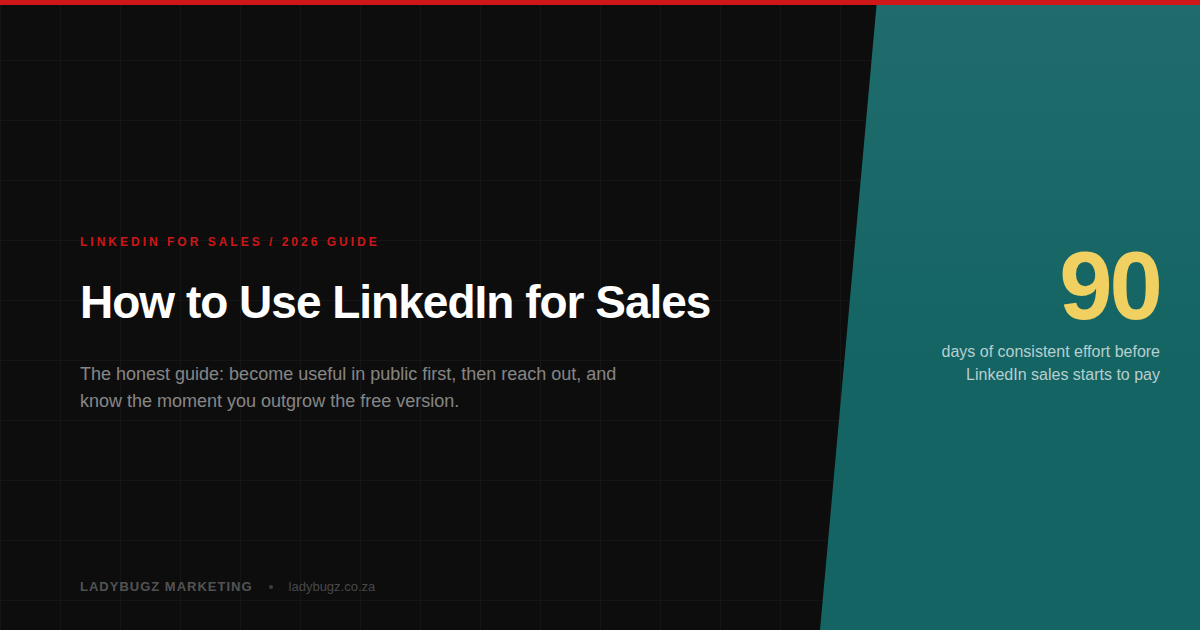
Give it about 90 days of consistent effort before you judge it, because this is a compounding game, not a quick win. The first few weeks feel quiet because you are planting. Month two and three is when it starts to pay.
The people who quit at week three never see it work, then conclude it does not work. This is exactly where our coaching keeps people accountable to the daily habit. The honest picture is that a steady 20 to 30 minutes a day beats occasional heroic bursts every time. Comment before you post, connect before you pitch, and give before you ask. Do that for a quarter and you will not recognise your pipeline.
None of this asks you to become someone you are not. No going viral. No performing. Just showing up as a useful, credible human in front of the right people, consistently. That is the durable part, and it holds no matter how the platform changes.
This is exactly what we teach. LadyBugz trains and coaches sales teams and individuals to do what this guide describes, from a hands-on LinkedIn training session for your team to one-on-one coaching that builds the habit until it sticks.
Talk to us: noleen@ladybugz.co.za
Noleen Thompson, Founder, LadyBugz Marketing
Editorial note
This guide reflects what is working on LinkedIn as of late 2026, drawn from our own research and testing. LinkedIn changes constantly, so treat the specific numbers as a snapshot to double-check, and treat the principles as the durable part. When in doubt, favour being genuinely useful to a real human. That never goes out of date.
Keep reading