Published Sunday, 18 October 2026 | By Noleen Thompson, LadyBugz Marketing
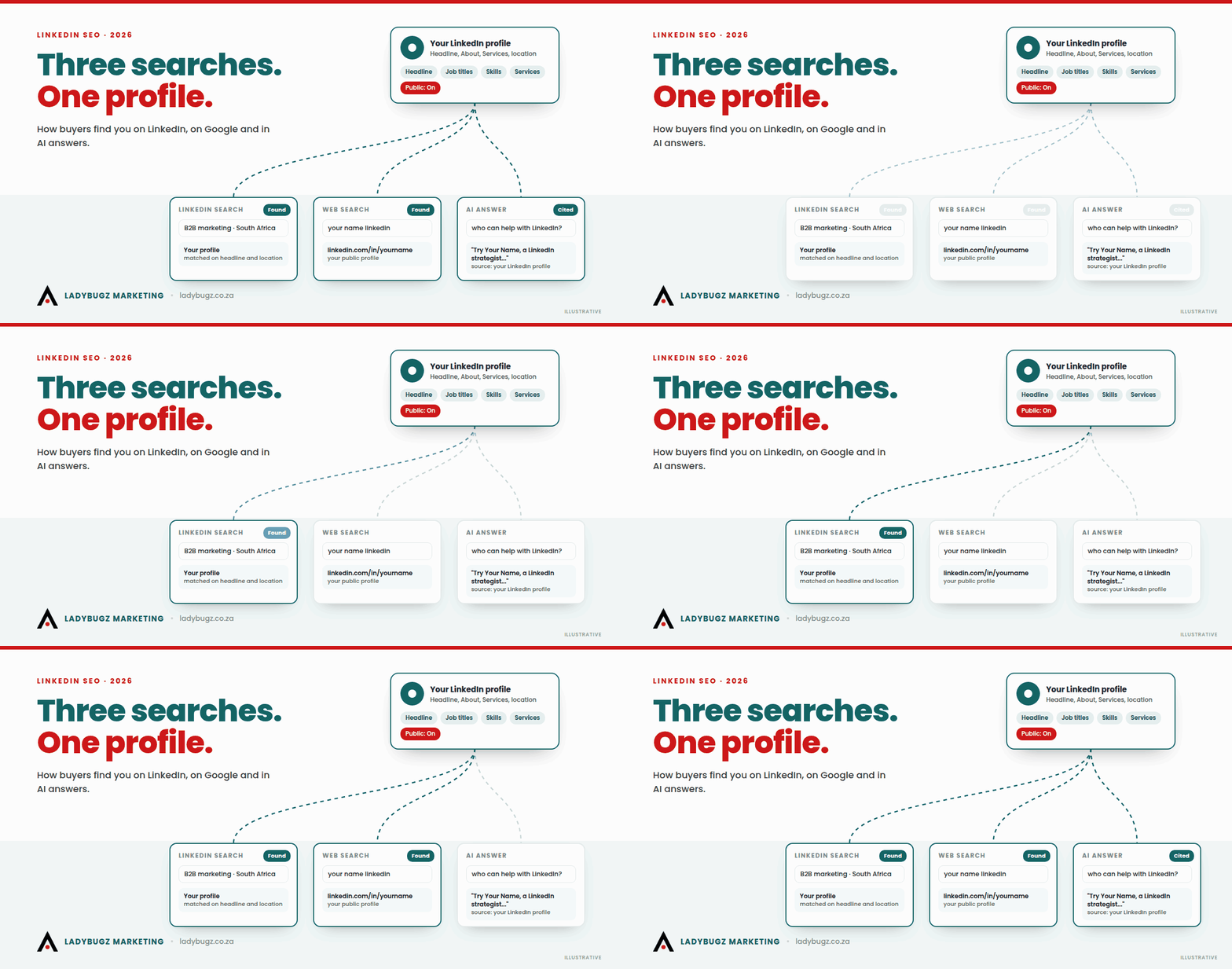
Your buyer looks for you in three places now: the LinkedIn search box, Google and an AI tool. Here is how the same few LinkedIn fields decide all three, and what each one looks like on your own screen.
LinkedIn SEO is the work of setting up your LinkedIn profile, articles and company page so the right people find you when they search. SEO stands for search engine optimisation. On LinkedIn it covers three searches at once: the search box inside LinkedIn, where buyers type a job title or a service; Google, which shows public LinkedIn profiles and articles in its results; and AI tools such as ChatGPT and Perplexity, which read those same public pages when someone asks them who to hire. You do not need three strategies. The same handful of fields, worded the way your buyer words things and switched to public, does most of the work in all three places.
Key Insights
- Three searches, one profile: buyers find suppliers through LinkedIn’s own search, through Google and through AI answers, and all three read the same public LinkedIn fields.
- LinkedIn search is personal: LinkedIn’s help page on people search says it produces “a results order that’s unique to each member”; your profile, your activity, your network and the searcher’s own history all shape the order.
- Job titles and services win inside LinkedIn: people search LinkedIn with short role and service words, so the words in your headline, job titles and Services page matter more than clever phrasing.
- Visibility is a setting: if the switch called “Your profile’s public visibility” is off, Google and AI tools cannot see your profile, whatever you write. LinkedIn warns that changes can take weeks or months to show on search engines.
- Articles carry their own SEO fields: a LinkedIn article lets you set an SEO title and SEO description; LinkedIn’s own help pages say titles over 60 characters get cut short and suggest 140 to 160 characters for the description.
- People beat pages in AI answers: Meltwater, a media monitoring company, analysed 9.5 million AI citations in 2026 and reported that about 75% of LinkedIn citations pointed to content from individual members, not company pages.
I have been on LinkedIn since November 2009, and for most of those years “being found” meant one thing: somebody typed your name or your job title into the LinkedIn search bar. That is changing fast. This guide covers the three searches, the fields behind them and the questions people ask most, with screenshots so you can follow along on your own profile. Where we have already written about a part of this in depth, I give you the short version and point you to the full piece.
What is LinkedIn SEO, and is it different from Google SEO?
LinkedIn SEO is about being findable inside LinkedIn and through it. Google SEO is about ranking your own website. The two overlap, because Google shows LinkedIn pages, but they reward different things.
Is LinkedIn a search engine?
Yes, for the people who use it to find suppliers, candidates and partners. A buyer who types “B2B marketing” (business-to-business marketing) into the LinkedIn search bar and filters by People and South Africa is running a search, and LinkedIn decides what comes back and in what order. Many business owners still use LinkedIn mainly as a feed to scroll. A buyer with a supplier to find is far more likely to open the search box.
How is LinkedIn search different from Google search?
Three differences matter.
- The words are shorter. On Google people type full questions: “who can help my company get more leads from LinkedIn”. On LinkedIn they type a role or a service: “LinkedIn consultant”, “financial director”, “payroll services”.
- The results are personal. Google tailors results a little too, but LinkedIn says outright, on its help page for people search, that results depend on your profile and activity, your connections and network, how other members behaved on similar searches, and the searcher’s own history.
- Your network is part of the ranking. LinkedIn lists your connections and network as one of the things that shape the order, so how close you are to the searcher counts. (A first-degree connection is someone you are directly connected to.) On Google, nobody’s results depend on whether they know you. Building the right network is part of being found.
Where do buyers look for a supplier now?
In all three places, often in the same week. A finance director hears your name at a breakfast, searches you on LinkedIn, Googles the company, then asks ChatGPT “who are good B2B marketing agencies in South Africa” to see if you come up again. Every one of those touches lands on the same public LinkedIn fields.
Most LinkedIn SEO advice treats AI as a footnote. I treat it as the third search, because it has worked for me: at LadyBugz, an increasing number of our enquiries are coming from AI. One had asked ChatGPT who to talk to about LinkedIn help.
We have already covered how AI tools read LinkedIn (what the automated programs that read websites, called crawlers, can reach, why articles are the more dependable page to quote, and how to write so AI lifts your sentences) in my piece What LinkedIn Actually Lets AI See, and How to Write So It Quotes You Back. This guide stays on the parts that piece did not cover: LinkedIn’s own search box, the settings screens and the article SEO fields.
How do buyers actually search for someone like you on LinkedIn?
They type a short role or service word, then filter by People, Services or Location. Your job is to make sure the words they type appear in the places LinkedIn reads first.
What do buyers type into the LinkedIn search bar?
Mostly nouns. A job title (“marketing director”), a service (“LinkedIn training”), a specialism (“POPIA compliance”, meaning South Africa’s Protection of Personal Information Act) or a company name. Then they choose what they want to see (People, Companies, Posts, Services and so on) and narrow it with filters such as location and connection level (1st, 2nd or 3rd+).
In South Africa the wording has a local flavour, and it pays to mirror it:
- Local job titles. Many South African companies still say “financial director” (FD) where an American profile says “chief financial officer” (CFO), and “managing director” (MD) where an American says “chief executive officer” (CEO). If your buyers say MD, make sure MD appears somewhere a search can find it.
- Places. Buyers often add a city or province: Johannesburg, Cape Town, Durban, Gauteng. Your location setting does that work for the filter, and naming the regions you serve in your About section helps when people type them as words.
- Professional designations. Chartered accountant or CA(SA), admitted attorney, professional engineer. If your buyers check for a designation, spell it out the way they would type it.

How does LinkedIn decide who shows up first?
LinkedIn does not publish a formula. What it does say, on its help page about people search relevance, is that the order is unique to each searcher and is shaped by:
- your profile and your activity on LinkedIn;
- your connections and network;
- how other members behaved on similar searches;
- the searcher’s own activity and past searches.
So match the words, stay active, and get connected to the kind of people who search for you. The first two you can fix this week. The third takes longer.
Has LinkedIn’s AI search changed how people search?
It is starting to. In November 2025 LinkedIn launched an AI-powered people search for Premium subscribers in the US, where you describe who you want in normal language (“someone who’s grown a small business”) instead of guessing keywords. Social Media Today reported in April 2026 that LinkedIn was widening this conversational search to all users, while AI summaries explaining why a person appears in results were rolling out to US members first. What you see on your screen in South Africa depends on LinkedIn’s rollout.
For you, this means plain, specific descriptions of what you do and who you do it for are becoming as important as exact keywords. A profile that says “I help manufacturing companies in Gauteng win more B2B leads from LinkedIn” matches both an old-style keyword search and a new-style plain-language one. A profile that says “Passionate about growth” matches neither.
Why can’t buyers find you on LinkedIn?
When we look at a profile that never shows up for its owner’s own service, it is usually one of these:
- The words are not there. The headline says “Founder at Acme” and nowhere on the profile does the word for the service appear.
- The words are somewhere LinkedIn does not read as text, such as baked into a banner image.
- The location is missing or wrong, so the profile drops out the moment a buyer adds a location filter.
- The network is too far from the buyer. If none of your connections sit near your buyer, you are a stranger to them. (LinkedIn calls a friend of a friend of a friend a third-degree connection.)
- The profile has gone silent. LinkedIn lists your activity on LinkedIn as one factor, and a profile that has been silent for months gives it less to go on.
How do buyers search for a service provider on LinkedIn?
LinkedIn has a separate Services tab in search, and it is the most overlooked way to show up. According to LinkedIn’s help pages, a buyer types a keyword, opens the results and clicks the Services tab, then filters by service category, location and connections. Service providers who have listed their services appear there, and a Service Page is how you present yours.
LinkedIn describes Service Pages as free landing pages that list the services you offer, open to freelancers and small business owners globally except in China, and says they make your services more discoverable on LinkedIn and through search sites such as Google. The Premium Business, Sales Navigator and Recruiter Lite subscriptions add extra showcase features; the basic page is free. If you sell a service and do not have one, you are missing from a whole tab of results.


Which keywords should you use, and how do you find them?
Use the words your buyer uses, not the words your industry uses about itself. Three places to start, none of which costs anything:
- Type your service into the LinkedIn search bar and read the suggestions that drop down.
- Ask your last five clients what they typed, or who they asked, when they first went looking.
- Check your Search Appearances (more on this in the last section), where LinkedIn shows the job titles you were found for.
Working out the full set of words, and where each one belongs, is the part we do for clients.
Which profile fields matter most for being found?
The headline, your job titles, the opening lines of your About section, your skills, your Services page and your location. Each one does a slightly different job.
We have a step-by-step piece on rewriting your profile so AI can read and quote it: how to update your LinkedIn profile so AI search can find and quote you. Here I look at the same fields through the lens of search: what each one does for LinkedIn’s search box and for Google.
What should your headline say?
Your headline is the line under your name everywhere you appear: search results, comments, connection requests and Google’s result for your name. It does two jobs at once. It has to contain the words a buyer searches for, and it has to make a human want to click.
A simple test: could a buyer find you by searching for any single phrase in your headline? “Founder | Speaker | Dreamer” fails. “LinkedIn strategist for South African B2B companies | Organic lead generation” passes, because “LinkedIn strategist”, “B2B” and “lead generation” are all things people type.
Put the most important words first. The headline can be cut short in search results and comment threads, so the front half has to stand on its own. You can see mine in the next screenshot; judge it by the same test.
How long can your headline be?
Up to 220 characters, which is enough for a role, a specialism and who you serve. The Edit intro box shows a counter under the headline as you type; mine uses 186 of the 220. Use the room for search words and a clear promise, not a list of every title you have ever held.

Does your About section help you get found?
Yes, but mostly through its opening lines. On a phone, LinkedIn shows the first few lines and then cuts off with “more” (about six lines on my phone), and many visitors never tap it. Logged out on a computer, a stranger may see just one line. Those lines are also what a person scanning your profile reads first. Write them as a plain sentence about who you help and how, with your main service words in it. Save the story for further down.

Do job titles in your Experience section matter?
More than most people expect, because buyers and recruiters search on titles. If your formal title is “Director” but the work you do is “LinkedIn strategy”, say both: “Director, LinkedIn strategy and B2B lead generation”. Then fill in the box under it, which the Edit role window now labels Highlights, with real detail. Each line there is more searchable text, and a blank role with only a title and dates wastes the space.

How many skills should you add?
LinkedIn lets you add up to 100 skills, according to its help pages, and tells you when you reach the limit (“You’ve added the maximum number of skills”). More is not the goal. Pick the skills a buyer would search for and that match the work you want more of, and make sure the most important ones are near the top where people see them first. A list of 80 skills where your main service sits at number 47 does not help anyone.

Does your location setting matter?
Location is one of the first filters a buyer adds, so a blank or out-of-date location removes you from those results. Set it to where your buyers would expect to find you. If you serve the whole country, mention that in your About section in words too.
Is there anything you should not do with keywords?
Three things.
- Do not put keywords in your name field. LinkedIn’s “Names allowed on profiles” rules say the name fields are for your real or preferred professional name (plus pronouns if you like), not business names, email addresses or other text.
- Skip the repeats. LinkedIn’s help page on practices to avoid discourages repeating the same words and phrases, and its search page warns that profiles that look over-optimised can lose visibility. “Marketing | Marketing Consultant | Marketing Expert” reads as spam to the human too.
- Do not hide your words in images. Search reads text. A banner that says “B2B lead generation specialist” in beautiful type is just a picture to LinkedIn’s search, which matches the words in your profile, not the words in your images.
Can Google and AI even see your profile?
Only if your public profile is switched on. This is the setting people get wrong most often, and no amount of good wording fixes it.
How do you make your LinkedIn profile show up on Google?
On a computer, open your profile and click the pencil (edit) icon next to “Public profile & URL”. In the LinkedIn app, go to Settings, then Visibility, then “Edit your public profile”. On a computer this opens a page called Public profile settings. On the right you will find “Edit your custom URL” and, under “Edit visibility”, the switch called “Your profile’s public visibility”. When it is on, search engines such as Google, Bing and DuckDuckGo can show your profile. When it is off, they cannot. On the same screen you can choose which sections strangers see.
LinkedIn’s help pages also warn that after you change your public profile, it may take several weeks or even months for search engines to pick up the change, and that LinkedIn does not control that timing. So fix it now, and do not panic if Google still shows your old headline next week.

Should you customise your LinkedIn URL?
Yes. A custom URL (web address) such as linkedin.com/in/yourname is easier to share, easier to put on a business card and email signature, and it matches what people type when they search your name. LinkedIn’s own help pages say a custom URL must be 3 to 100 characters with no spaces, symbols or the word “LinkedIn”. You can change it up to five times in six months, after which you are locked for six months, so choose one and keep it.
How do you check what a stranger sees?
Open your profile in a private or incognito browser window, where you are not logged in. That is roughly what Google and a first-time visitor see. When I checked mine on 18 October 2026, the logged-out page showed my name, location, current company and the first line of my About section. My headline did not show under my name, and my experience sat behind a “View Noleen’s full experience” sign-in box. Your headline still matters: Google uses it, as you will see in the last section, and so does everyone who is logged in.


Can AI tools like ChatGPT read your profile?
They can reach the same public layer Google can: your public profile, your LinkedIn articles and newsletters, and company pages. Ordinary feed posts are a less dependable way to be found, although AI tools do cite some public posts. I have unpacked the detail in What LinkedIn Actually Lets AI See, so I will not repeat it here. For this guide, remember one thing: public visibility is the door, and articles give AI the steadiest page to read.
How do you set up a LinkedIn article so Google and AI can find it?
Write the article as an answer to a real question, give it proper headings, and fill in the SEO title and SEO description before you publish. LinkedIn articles get their own permanent web address, which is why they show up on Google far more reliably than posts.
Are LinkedIn posts indexed by Google?
“Indexed” means Google has stored a page so it can show it in results. For posts, the answer is sometimes, and not in a way you can plan around. Public posts can turn up in Google, but neither LinkedIn nor Google publishes a rule you can rely on, so treat a post that turns up there as a bonus. If you want something to be found in six months’ time, make it an article or a newsletter edition.
Are LinkedIn articles indexed by Google?
Articles and newsletter editions are published at a permanent, public linkedin.com/pulse/ address that search engines can read, and LinkedIn gives you settings to control how they appear in search results (next question). That makes them the most dependable thing you can publish on LinkedIn if you want to be found on Google. Meltwater’s 2026 study adds an AI angle: ordinary text posts made up most of the LinkedIn content AI tools cited, simply because there are so many of them, but each article earned about 6.5 times more citations than a standard post.
Here is one of mine. When I searched the title of my article “Why Are You Still Invisible to the People Who Could Change Your Career?” on 18 October 2026, Google’s AI Overview cited the article on LinkedIn as a source.

What are the SEO title and SEO description fields?
They are two optional fields in LinkedIn’s article and newsletter editor that control what Google shows for your article. To find them, open your article in the editor, click Manage at the top right, then Settings. A window called Settings opens, and under SEO you will see a Title box and a Description box. Fill them in and click Save.
- SEO title replaces your article title in search results. LinkedIn’s own help pages say that if it is over 60 characters, it will be cut short.
- SEO description replaces the first few lines of your article in search results. LinkedIn suggests using keywords, summarising the piece and aiming for 140 to 160 characters, and the box has a counter out of 160.
Why bother? Your article title can be playful (“The morning a client told me ChatGPT sent her to me”). Your SEO title should be what a person actually searches (“How do clients find a LinkedIn consultant through ChatGPT?”). The fields let you have both.

How should you structure the article itself?
Like the page you are reading now.
- A question as the headline, worded the way your buyer would ask it.
- The answer in the first two lines, before any story.
- Real headings from the editor’s style menu, not bold text pretending to be a heading. Search engines and AI tools use headings to break a page into pieces they can match to a question.
- Short paragraphs and real lists.
- Alt text on images, where the editor offers it, a short description of what the image shows, which helps screen readers and gives search a text version of the picture. The editor also lets you add a caption under each image; write it in plain words too.
- A cover image at the size LinkedIn recommends in its help pages, 1920 by 1080 pixels (16:9). The editor also accepts a video as the cover. LinkedIn no longer accepts animated images (GIFs) as article cover images.


Should you publish articles or start a newsletter?
A newsletter edition is found the same way as an article and has the same SEO fields; the subscriber notification only gets it read sooner. If you have a steady rhythm in you, a newsletter on your personal profile is worth it. We have set out the case in why you should consider a LinkedIn newsletter on your personal profile.
Can you republish your blog posts on LinkedIn?
Yes, with care. Google does not run a “duplicate content penalty” for ordinary republishing; its guidance says that when it finds copies it chooses the version it judges best to show, which may not be yours. Whichever you publish first, add a line on the second copy saying where the piece first appeared, and rewrite the opening for the reader on that platform.
Can a LinkedIn article outrank your own website?
It can, because Google tends to give a large, long-established site like linkedin.com a head start over a young business website. That is not a problem if the LinkedIn article carries your name, links to your site and sends the buyer to you. It is only a problem if you put your best thinking on LinkedIn and nothing on a site you own.
What should your company page do that your profile cannot?
Your company page proves the business is real and gives Google and AI a clear description of what it does. Your people do the finding.
Does a LinkedIn company page rank on Google?
Especially for searches on your company’s name. Company pages are part of the public layer of LinkedIn, alongside profiles and articles. For a search on your brand, your LinkedIn page often sits near your own website in the results. That makes the tagline and overview a second shop window that you write yourself.
What should the company page tagline and overview say?
- Tagline: one plain line that says what you do and for whom, with your main service words near the start. LinkedIn gives you 120 characters for it. It shows under your page name and can be what Google shows in its description.
- Overview: the first lines say who you serve, what you do and where. Fill in the Details tab too (industry, company size, locations, website), because those are facts that directories and AI tools may repeat. The industry, location and company size also show on the line under your tagline.
We have a fuller guide on how to optimise a B2B LinkedIn company page for lead generation, so I will keep this to the search angle.


Company page or personal profile: which matters more for being found?
Your people, by a distance. Meltwater analysed 9.5 million AI citations across six AI models over about four weeks in 2026 and reported that roughly 75% of the LinkedIn citations pointed to content posted by individual members, with the rest going to company pages. In my experience, buyers deal with a person long before they deal with a logo. We unpacked why in why AI search cites your employees, not your brand.
So set up the page properly once, keep it current, and then put most of your effort into the profiles of the people your buyers actually deal with: the founder, the sales lead and whoever your buyers actually phone.
How do you know if it is working?
Run three checks: LinkedIn’s Search Appearances, a Google search for your name, and an AI question your buyer would ask. Each one tests a different search.
What are search appearances on LinkedIn?
Search Appearances is a section of your profile analytics that shows how often you came up in LinkedIn search. According to LinkedIn’s help pages, it shows where you appeared, the top companies your searchers work at, their top job titles, and the job titles you were found for. In the current layout it sits in Profile analytics on your own profile, under Profile appearances, where a Search appearances count sits next to All appearances and a drop-down shows “Job titles you were found for”. My screen carries a Premium label, so what a free account shows may differ.

An appearance is not a profile view. It means you were in someone’s results, not that they clicked. Watch two things over time: is the number going up, and are the searchers’ job titles the people you want to sell to? If you appear mostly for a job you left three years ago, your profile is still describing the old you.
Three checks anyone can do in ten minutes
Check 1: search LinkedIn the way a buyer would. Type your main service, click People or Services, add your location filter. Do you appear? Who appears instead, and what words are in their headlines? Treat it as a sense-check: LinkedIn personalises results for each searcher, so what you see is one view of many.
Check 2: search Google for your name plus “LinkedIn”. Does your profile come up, and does the short text under it show your current headline? If it shows something old, check your public visibility and give Google time.

Check 3: ask an AI tool your buyer’s question, for example “who can help a South African B2B company with LinkedIn?”, and note which LinkedIn page it cites, if any. We set out a fuller version of this test in our profile guide linked above.

How long does LinkedIn SEO take?
Changes inside LinkedIn’s own search can show up sooner than on Google, though LinkedIn gives no timeline. Google is slower, and LinkedIn says profile changes can take weeks or months to appear there. AI tools are the least predictable, because they depend on what they have read and when. Change the fields once, properly, and then give it a quarter before you judge it.
Frequently asked questions about LinkedIn SEO
Does LinkedIn help my website’s SEO?
Indirectly. Do not count on a link from your LinkedIn profile to lift your website’s Google ranking. Count on it to send people. A strong profile and good articles bring buyers to your site, and that is the part that turns into business.
Do hashtags still help on LinkedIn?
Less than they used to. Social Media Today reported in February 2024 that LinkedIn removed hashtags from profiles, and discovery now leans on the words in your posts and profile. A couple of relevant hashtags on a post do no harm; the words in the post itself carry the weight.
Does creator mode still exist?
No. Social Media Today reported in February 2024 that LinkedIn was retiring creator mode. Tools it used to switch on, such as the Follow button as your main profile button, Featured and creator analytics, became available to everyone. If a guide still tells you to switch it on, the guide is out of date.
Does LinkedIn Premium push you higher in search results?
No. LinkedIn says it cannot guarantee a particular order for your profile in search, regardless of your subscription level. Premium adds extra tools, and the AI-powered people search launched first for Premium subscribers in the US, but the core of being found is still your words, your settings and your network. Check LinkedIn’s own plan pages for what each subscription currently includes.
Can I put keywords in my LinkedIn name?
No. LinkedIn’s rules say the name fields are for your real or preferred professional name, and its help pages say its Trust & Safety team can take action on profiles that break the rules.
What should go in my Featured section?
Your strongest proof. LinkedIn’s help pages list four types: posts, articles you published on LinkedIn, links to outside websites, and uploaded media such as documents, images and videos. Pin an article that answers your buyer’s biggest question, a case study or a booking link. On a Premium account you can also feature a recommendation; LinkedIn marks it “Featured with Premium”.

Does a second-language profile help?
Sometimes. LinkedIn lets you add a version of your profile in another language, which people see if they use LinkedIn in that language. You write the translation yourself, and you set it up on a computer, not in the app. Afrikaans and isiZulu are not on LinkedIn’s list of supported profile languages at the time of writing, so check the list in your own settings first. It is most useful if you sell into Europe or elsewhere in Africa in French, Portuguese or German.
Does “Open to work” or “Providing services” affect search?
“Providing services” ties to your Service Page and the Services tab in search, so it matters for anyone selling a service. “Open to work” is for job hunting. Turn it on only if you mean it, because a buyer who sees it may assume you are about to leave.
Does posting regularly affect LinkedIn SEO?
Probably. LinkedIn says your profile and activity can influence people search results, but it does not say how much posting counts. In my experience, regular posting keeps your profile in front of the network that searches for you, and a steady habit beats a burst.
How do I hide my LinkedIn profile from Google?
Turn off “Your profile’s public visibility” (on a computer, via the pencil icon next to “Public profile & URL” on your profile; in the app, via Settings, Visibility, “Edit your public profile”). It can take weeks for search engines to drop it, and it does not hide you from people searching inside LinkedIn.
The lunch-table version
If you were across the table from me, I would ask you to do three things this week. Search LinkedIn for your own service and see who turns up instead of you. Rewrite your headline and the first two lines of your About section in the words your buyer types. Then check that your public visibility switch is on. Most of the profiles we review fall down on at least one of those, and none of them needs a specialist to fix. What takes longer, and where we spend most of our time with clients, is working out the exact words their buyers use and building a network and a run of articles that keep them in all three searches month after month.
Want to know how your profile looks to LinkedIn search, Google and AI?
Or email us at noleen@ladybugz.co.za
Noleen Thompson, LadyBugz Marketing
Keep reading