Published 21 November 2026 | By Noleen Thompson, Managing Director and Founder, LadyBugz Marketing
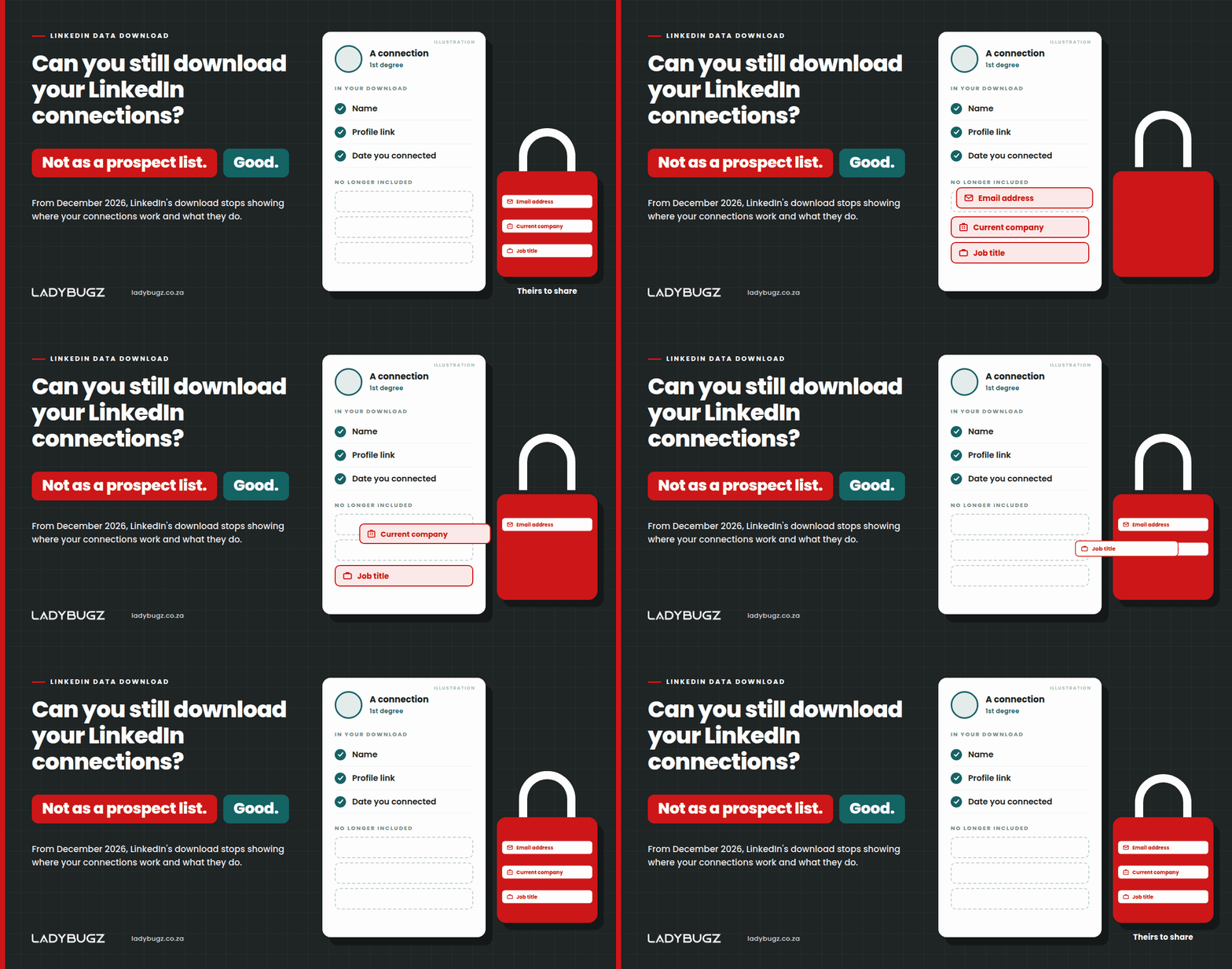
From December 2026, LinkedIn’s data download stops telling you where your connections work and what they do. Email addresses were never the real story. Here’s what’s changing, how to download what’s left, and why we think it’s a loss for people who spam their connections and a win for everyone else.
Key Insights
- What LinkedIn says: LinkedIn’s Download my data page now reads: “As of December 2026, your data download no longer includes your connections’ email addresses, current companies, or job titles.”
- Email addresses were already limited: since November 2018, each LinkedIn member’s privacy settings have decided whether connections can download their email address, and the setting was “No” by default when LinkedIn added it, TechCrunch reported at the time.
- Company and job title are the real loss: from December you still get your connections’ names and profile links, but nothing that shows where they work or what they do, so the download is no use as a prospect list.
- The spam shortcut gets harder: in our experience, some sales teams download their connections and run the list through tools that find email addresses. In our view, removing company and job title takes away much of what those searches start from.
- LinkedIn hasn’t given a reason: we found no LinkedIn announcement explaining the change when we checked on 21 November 2026. Back in 2015, LinkedIn said it wanted members to “have control of what data can be exported by their connections.”
Yes, but not as a ready-made prospect list. From December 2026, LinkedIn’s data download leaves out your connections’ email addresses, current companies and job titles. You can still request your connections in LinkedIn’s larger data archive, and you’ll still get their names and, according to LinkedIn’s Help Center, their profile links. You won’t get anything that tells you where they work or what they do. That’s a loss for anyone who used the download to fill a cold email list, and we think it’s a win for everyone tired of being on one.
Email addresses were never the point. They’ve been limited for years, because each person decides in their privacy settings whether their connections can download their address, and that setting was off by default. What worries me is what people did with the list. I know people who download their connections, run the list through tools that find email addresses, and then email everyone on it. Years ago, when you downloaded your data or had the LinkedIn app on your phone, you even got people’s contact numbers. I still have a huge list of numbers on my phone from the LinkedIn app, many of them people I’m no longer connected to. And no, I don’t use it.
What is LinkedIn changing in the connections download?
LinkedIn is removing three things from the connections data you can download: your connections’ email addresses, their current companies and their job titles. The notice sits at the bottom of the Download my data page in LinkedIn’s settings.
On the page today, the “larger data archive” still lists connections, along with verifications, contacts, account history and what LinkedIn infers about you. LinkedIn hasn’t given an exact date in December. Its Help Center, checked on 21 November 2026, still describes the connections file as first and last name, public profile URL, email address, company, position and connection date. Take away the three items in the notice and you’re left with names, profile links and the date you connected: nothing that tells you where people work or what they do.
Why does losing company and job title matter more than losing email addresses?
Losing company and job title matters more because they’re what turned a download of your connections into a prospect list. A name tells you who someone is. Their employer and role told you whether to sell to them, and gave tools that find email addresses something to search on.
The shortcut works like this. Download the connections file, filter it by job title and company, run it through a tool that guesses or finds work email addresses, then load the results into an email campaign. Few, if any, of the people on that list agreed to it. All they did was connect on LinkedIn.
From December, the download stops supplying the company and job title columns. Profile links are still in the file, so the shortcut isn’t gone, but in our view it’s a lot harder, and we won’t miss it.
Want your team turning connections into real conversations instead of spreadsheets?
Book LinkedIn training for your team
When did LinkedIn stop letting you download connections’ email addresses?
In November 2018, LinkedIn stopped including connections’ email addresses in data downloads by default, when it added a privacy setting that decides whether your connections can download your address. TechCrunch reported on 21 November 2018 that the setting was “No” by default and had arrived without an announcement. HR Dive reported about a week later that the change stopped other members, recruiters included, from exporting contact information to spreadsheets, “particularly email addresses of those to whom users are connected”.
Here’s how the limits have built up:
- July 2015: LinkedIn switched off its quick CSV connections download “as part of our ongoing efforts to combat the inappropriate export of member data by third parties”, then switched it back on days later when members complained about the wait.
- November 2018: Connections’ email addresses became opt-in, through the privacy setting above.
- Phone contacts: LinkedIn’s Help Center now marks importing and syncing your phone contacts on the mobile app as “No longer available”, saying: “we no longer support syncing contacts.” It doesn’t say when, or why beyond investing in other features.
- December 2026: Connections’ current companies and job titles go, along with any connection email addresses that were still included.
How do I download my LinkedIn connections now?
You download your LinkedIn connections by requesting the larger data archive from your settings, on a computer rather than the mobile app.
Step 1: Open your settings. Click the Me icon at the top of your LinkedIn homepage and choose Settings & Privacy.
Step 2: Find your data. Click Data privacy, then the option to download or get a copy of your data.
Step 3: Choose the larger archive. Select “Download larger data archive”, the option that includes connections.
Step 4: Request it. Click Request archive, then watch for an email to your primary email address with a download link.
Allow up to two days. LinkedIn’s Help Center says 24 hours in one place and 48 in another, and the download link stays live for 72 hours.
Why is LinkedIn doing this?
LinkedIn hasn’t said why it’s removing email addresses, current companies and job titles from the connections download. We found no announcement or press statement explaining it when we checked on 21 November 2026, so this is our reading.
In 2015, LinkedIn product leader Michael Korcuska wrote on its engineering blog: “We believe that the data our members enter into LinkedIn is theirs and they should be able to export it. We are also committed to ensuring members have control of what data can be exported by their connections.” We think that’s the principle at work. Your own data is yours to download. Where your connections work and how to reach them is theirs to share. Our own Information Regulator announced a R1 million POPIA fine against FNB in October. My reading is simple: LinkedIn is taking personal data seriously too.
A connection was never consent
Accepting a connection request on LinkedIn doesn’t give anyone permission to put you on a mailing list, and, on our reading, neither POPIA (the Protection of Personal Information Act) nor Europe’s GDPR treats a connection as consent. The download just made it easy to forget.
Under POPIA, personal information includes a person’s “e-mail address” and their “employment history”. Section 69 says direct marketing by “any form of electronic communication”, email included, “is prohibited” unless the person has given consent or is already your customer, and even then only to market your own similar products or services, with a chance to opt out each time. You may ask someone for that consent only once, and only if they haven’t already said no.
The same note, which calls itself “advisory in nature”, says the first message to someone who isn’t your customer “must be a communication requesting consent”. We’ve set out the fines and South Africa’s new opt-out registry in why ignoring POPIA and the opt-out registry costs you three times.
In the European Union, the GDPR (General Data Protection Regulation) generally requires you to tell people when you’ve collected their personal data from somewhere else, at the latest within one month, or when you first contact them if that’s sooner (Article 14). An email address found by a tool from a name and employer taken out of LinkedIn, and mailed without a word, is hard to square with either law. This isn’t legal advice. If you’re unsure, ask your Information Officer (the person who oversees your organisation’s POPIA compliance) or a privacy lawyer.
Want your sales team starting conversations their connections are glad to have?
Book LinkedIn training for your team
What does this mean for B2B sales and marketing teams?
For most B2B (business-to-business) teams, the LinkedIn download stops being a ready-made prospect list from December, and any list already built from one deserves a second look.
- Prospect lists: from December, you can’t sort a download by company or job title. Finding the right people happens inside LinkedIn, through search and your network.
- Lists already in your CRM (customer relationship management system): most contacts built from old downloads never agreed to be emailed. Note where each one came from and what they agreed to. Our article on what the FNB and TVET POPIA fines mean for your marketing database explains why a marketing list counts as personal information.
- Cold email: emailing addresses found this way, without consent, was never a good idea under section 69. From December, the download no longer hands you company and job title to filter on.
- Cold messages on LinkedIn: a cold sales message in someone’s LinkedIn inbox isn’t a workaround. The Regulator’s note puts it in the same list as email.
What should B2B teams do instead of downloading connections?
B2B teams should build relationships on LinkedIn and grow their own permission-based lists, so that everyone they email has chosen to hear from them. Our guide to permission-based marketing on LinkedIn has more on how it works, and our replay of The LinkedIn Permission Bank: Turn Connections Into Conversations shows the conversation side.
Earn the conversation on LinkedIn. Posts, comments and a profile that shows what you know give people a reason to come to you.
Ask before you move off the platform. When a conversation is going well, ask whether they’d like a follow-up by email, and note the answer.
Give people something to sign up for. A LinkedIn newsletter on your personal profile and a sign-up form on your own website build a list of people who said yes. Here’s why you should start a LinkedIn newsletter on your profile.
Keep a record of consent. Note where every contact came from, when they agreed and to what, and make it easy to say no.
This is slower than downloading a spreadsheet. It also lasts. One of our clients grew its LinkedIn company page following 3.5 times in four years, with no advertising spend.
Frequently asked questions
Can I still download my LinkedIn connections?
Yes. Request the larger data archive in Settings & Privacy, which LinkedIn’s page still says includes connections. From December 2026 you’ll get their names and profile links, but not their email addresses, current companies or job titles.
How long does a LinkedIn data download take?
LinkedIn’s Help Center says specific data categories arrive by email within minutes. The larger data archive, which holds your connections, arrives within 24 hours according to one line of the page and within 48 hours according to its table, so allow two days. The download link stays available for 72 hours.
Can I export my LinkedIn connections to Excel?
Yes. The connections file comes as a CSV (comma-separated values) file, which opens in Excel. From December 2026 it won’t show where your connections work or what they do.
Can I email my LinkedIn connections in South Africa?
Under section 69 of POPIA, electronic direct marketing, including email, to someone who isn’t your customer needs their consent first, and you may ask for that consent only once. The customer exception has its own conditions. Being connected on LinkedIn isn’t consent. This is general information, not legal advice.
A word over lunch
Over lunch, I’d tell you not to mourn the download. A list of names you never spoke to, padded out with email addresses a tool found for you, was always more risk than pipeline. Take the hour you’d have spent on that spreadsheet and have ten real conversations with people who already know your name. Then ask the interested ones if they’d like to hear from you by email. That list will be smaller, and every person on it said yes.
Our LinkedIn training is tailored to your team and your industry, in person or virtual, and includes a follow-up framework that turns connections into qualified conversations. Every workshop comes with a takeaway guide and 30 days of support.
Book LinkedIn training for your team
Prefer to talk it through first? Email me at noleen@ladybugz.co.za.
Noleen Thompson, Managing Director and Founder, LadyBugz Marketing
Keep reading